
Meet Grasshopper: the plug-and-forget device for nonstop rewards
Product July 8, 2025
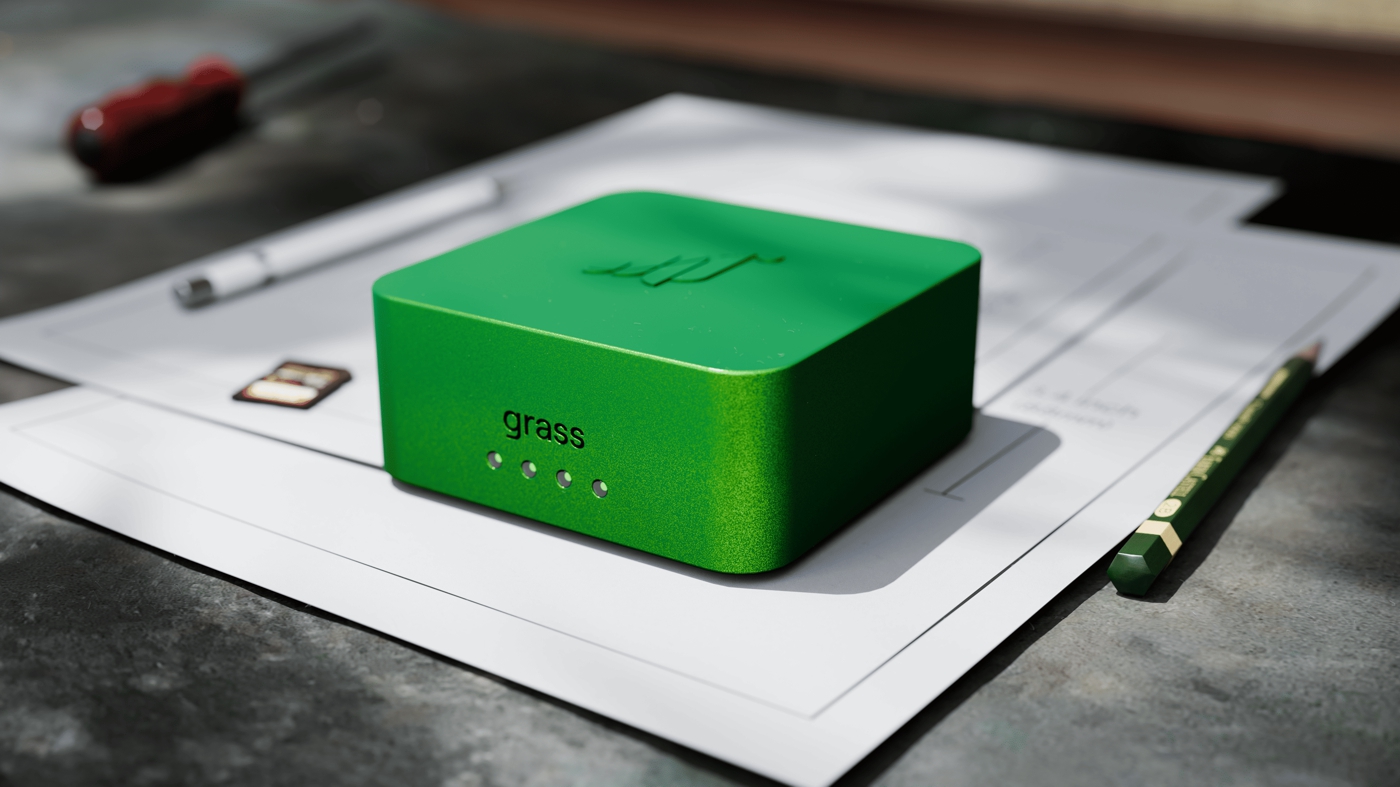
Most devices are tourists on your internet network: they drop in, do their job, then disappear. Grasshopper is a resident which plugs directly into your WiFi router to earn you rewards every second of the day. When your laptop or phone shuts off, earnings pause. Grasshopper keeps the rewards meter running.
Set-up takes one minute. Plug the device in, scan the QR code, and forget it. Grasshopper then only uses the internet you weren't using without slowing your own browsing, gaming, or streaming. It works silently in the background, so you won't even notice it's there.
No batteries, no tinkering, no downtime. Just a palm-size slab of aluminum turning spare internet into real ownership of a user-run web.
Why a standalone box?
Two reasons: more uptime and more ways to earn.
1. Steady uptime means higher rewards
Uptime rewards on the Grass network rise with steady uptime. Close a laptop, shut down a desktop, or leave home and your rewards flatten out. Grasshopper is hard-wired to your WiFi router and stays connected more than 99% of the time, which can help users earn more than what the same connection brings in on a computer.
2. Advanced features exclusive to hardware
The aluminum shell isn't just for looks. Grasshopper's extra horsepower and always-on connection let it handle more than just passing traffic. Over time, as the network upgrades, the box will be able to tag images, sort data, and even run a mini-browser for AI agents that need quick answers from the web. Automatic updates will give the Grasshopper new skills which unlock new reward streams without you lifting a finger.
As with everything from Grass, privacy and security comes built in. The Grasshopper is physically isolated from your personal devices and any traffic that runs through your router is protected through SSL encryption. Grass has no access to any user's personal browsing or network activity.
Zero-touch setup
1. Plug the included Ethernet cable into an open port on your router.
2. Scan the QR code with the Grass mobile or desktop app.
3. Walk away. Grasshopper autoupdates, rate-limits itself under congestion, and shows a single LED for status. That's the whole interface.
Security check
• Certifications: FCC & ICES-003 compliant. No strange signals, no overheating worries.
• Data boundaries: The firmware is locked, every connection is end-to-end encrypted, and the box is sealed off from the rest of your home network.
Want to learn more? Read the full Grasshopper FAQ.
Availability
• Grasshopper will begin shipping in limited batches starting Q4 2025. Details on availability and price will be shared closer to the first batch sale.
Ready to keep earning while everything else is on standby? Join the waitlist.
Grasshopper FAQ
• What resources are required to run a hardware node?
Just power and an internet connection via Ethernet. No CPU, memory, or storage requirements on your end.
• What does a hardware do?
It stays persistently online (24/7) to help relay traffic across the Grass network, reducing latency, improving uptime, and enabling more consistent bandwidth contributions.
• What are the benefits of running a hardware node?
Dedicated hardware nodes offer more consistent uptime and stable bandwidth contributions, which can translate into steadier and potentially greater rewards.
Over time, Grasshopper may also unlock new ways to contribute, like data tagging, sorting content, or powering lightweight AI tasks - all handled automatically through firmware updates. These features aren't live yet, but the hardware is built to support them.
Other specific reward details will be shared soon.
• How does it compare to the desktop app?
Functionally, it supports similar routing and bandwidth-sharing tasks as desktop, but with much higher reliability. It acts as a stronger, more persistent node.
• What is the cost of running a hardware node?
Just the one-time purchase of the Grasshopper device. Electricity usage is minimal, comparable to running a small smart home device or your internet router.
• What's the projected price of the Grasshopper device?
Pricing details will be announced closer to the first batch order date.
• Can one Grass account use multiple Grasshopper devices?
Yes if they are connected to unique internet routers with distinct IP addresses. Otherwise no, you can't have multiple Grasshoppers on one internet, much like you should not do that with the Grass app.
• Is Grasshopper noisy or does it emit noticeable heat?
Grasshopper operates silently and emits minimal heat. It meets all necessary safety and compliance standards, including FCC and ICES-003 certifications, making it completely safe and comfortable for indoor environments, similar to your home Wi-Fi router.
• How secure is Grasshopper?
Grasshopper meets FCC and ICES-003 standards. It only handles encrypted Grass traffic and is physically isolated from your personal devices, files, and browsing. No data from your home network is ever accessed or stored.
• What happens if my Grasshopper loses connection temporarily?
It will automatically reconnect as soon as internet access is restored.
• Does Grasshopper support Wi-Fi, or is Ethernet required?
Ethernet is required to ensure stable and consistent connectivity.
• Can Grasshopper slow down my home internet?
No, Grasshopper is designed to use only available, unused bandwidth, ensuring your regular internet usage remains unaffected.
• How much bandwidth does Grasshopper typically use?
Grasshopper only uses the internet you're not already using, so it won't slow down your browsing, streaming, or gaming. It also dials things back automatically if your network is busy. It never touches your private data - just safely relays Grass network traffic in the background.